


Available on
- 🖥️ Archipad Web
- 🤖 Android (same steps as the Web version)
- 📱 iPhone and iPad
An Observation allows you to record an item requiring attention at a specific location on a plan. During Acceptance, these Observations are typically called Punch items and are managed in the same way in Archipad.
You can create an Observation:
- during a Meeting, to track issues noted during a site meeting or Acceptance inspection.
- outside of a Meeting, to record an Observation at any time on the Project.
Create an Observation
- Open the Project.
- Open a Meeting or create an Observation outside of a Meeting.
- Select the relevant Plan.
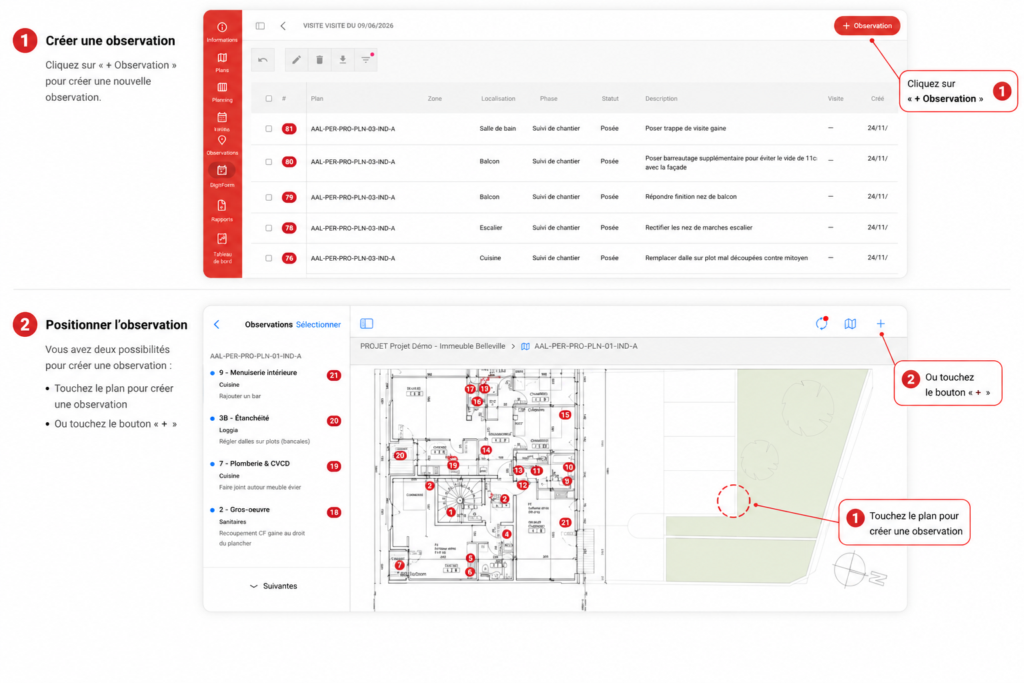
- Click + Observation.
- Click at the desired Location on the Plan.
- Fill in the Observation Information: Location, Work Package, description, Phase, due date, Status or Photos.
To know
Enter at least one piece of Information before leaving the Plan, otherwise the Observation will be deleted. It is recommended that you specify the relevant Work Package.
The final Number of the Observation is assigned automatically after synchronization.