


Centralize Participant contact information
Available on
- 🖥️ Archipad Web
- 🤖 Android (same steps as the Web version)
- 📱 iPhone and iPad
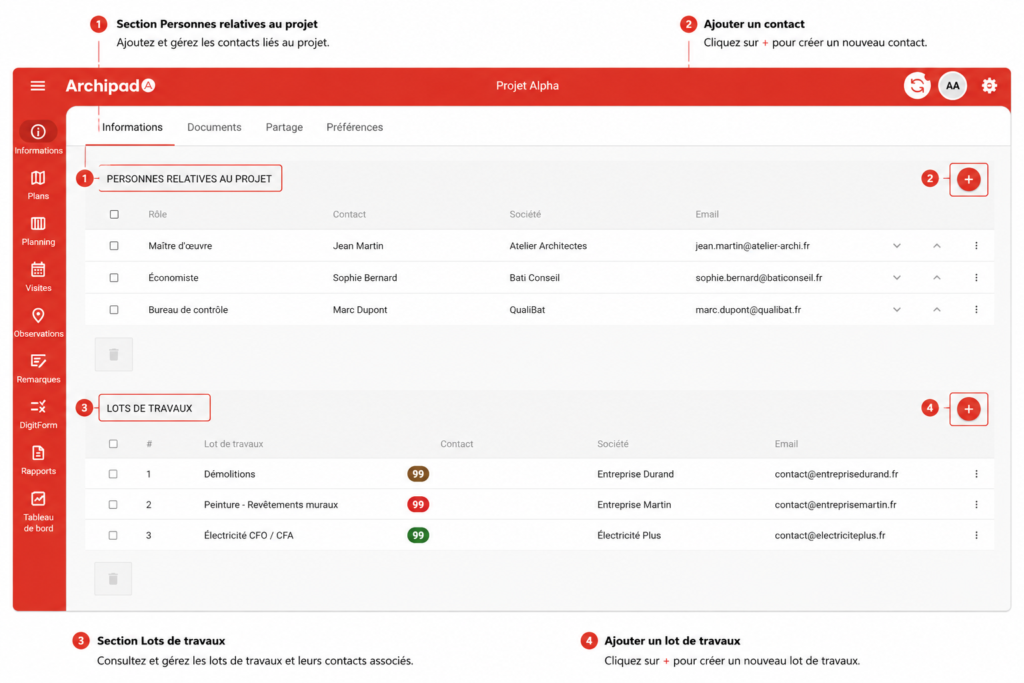
Add the contacts of the various Participants on the Project to centralize their contact information and make it easier to identify them throughout the jobsite.
Steps
- Open the Project in question.
- Go to Information.
- Scroll down to the Project-related people section and Work packages section.
- Click on +.
- Fill in the Contact Information:
- Name
- Company
- Position
- Phone
- Save the Contact.
Good to know
Adding a Contact only saves their contact information in the Project.
If you want to give access to the Project to an Archipad User, see the Share a Project with a Participant article.