


Available on
- 🖥️ Archipad Web
- 🤖 Android (same steps as the Web version)
Replace a Plan when a new version becomes available (revised Plan, architectural change, utilities update, etc.). Archipad automatically preserves Observations already positioned on the Plan to maintain site tracking.
Steps
- Open the relevant Project.
- Go to the Plans menu.
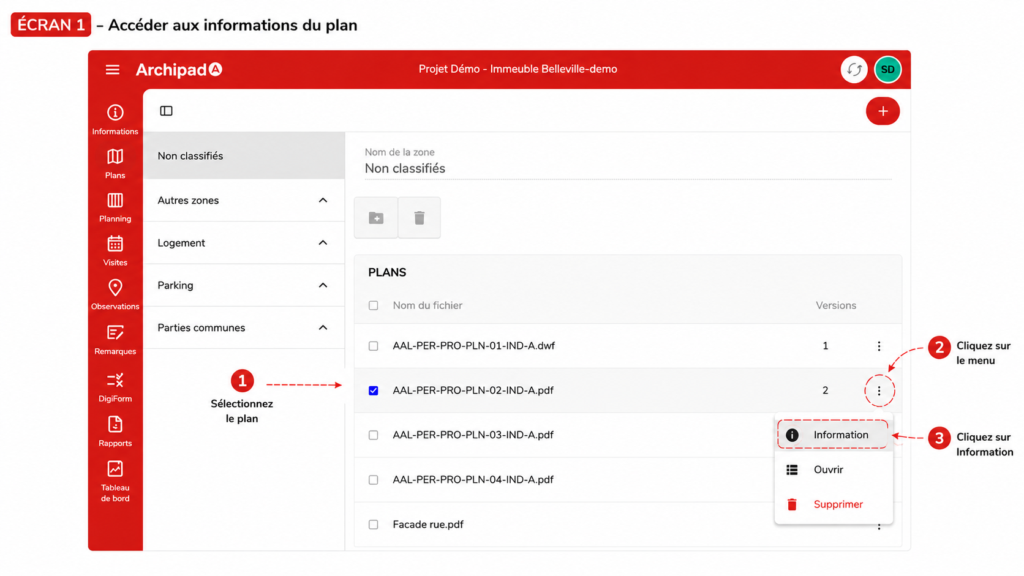
- Select the Plan to Update.
- Open the ⋮ menu, then click Information.
- Under Plan Versions, click +.
- Select the new file.
- Click Add.
- Once the import is Completed, open the ⋮ menu of the new version.
- Click Use this version.
To know
Each new imported file is added as a new version of the Plan. Previous versions remain accessible from the Plan Information.