


The observations list adapts to the drawing displayed. It allows you to view the observations for the current drawing and navigate to other drawings containing observations.
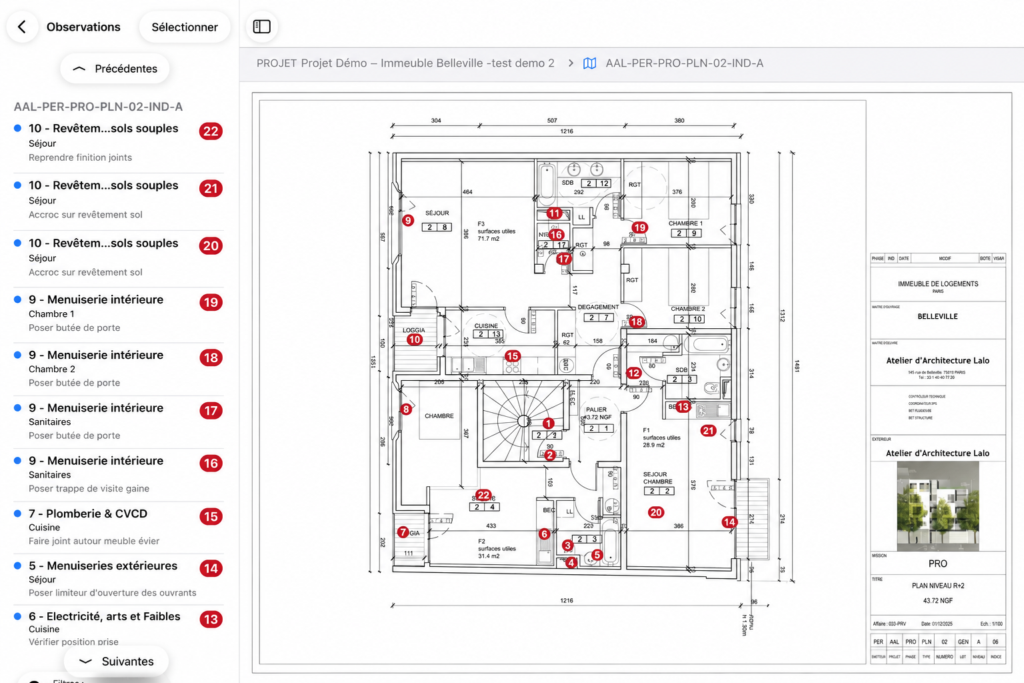
View observations on a drawing
- Open the desired drawing.
- Display the observations list from the drawing.
- Review the observations associated with the currently displayed drawing.
- Use Previous or Next to view observations on another drawing.
- Select an observation from the list to locate it on the drawing.
Good to know
The list displays only drawings that contain observations.
If a drawing contains no observations, it will not appear in the Previous / Next navigation. To open it, return to the Drawings view.
Selected filters are also applied to the list.
For example, if you filter by a specific trade package, the list displays only observations from that trade package, both on the displayed drawing and on other drawings containing observations related to that trade package.