


Available on
- 🖥️ Archipad Web
- 🤖 Android (same steps as the Web version)
Create sub-regions to structure your project more precisely and organize your Plans and Documents.
Sub-regions are created from Archipad Web. Once created, they are available on all platforms.
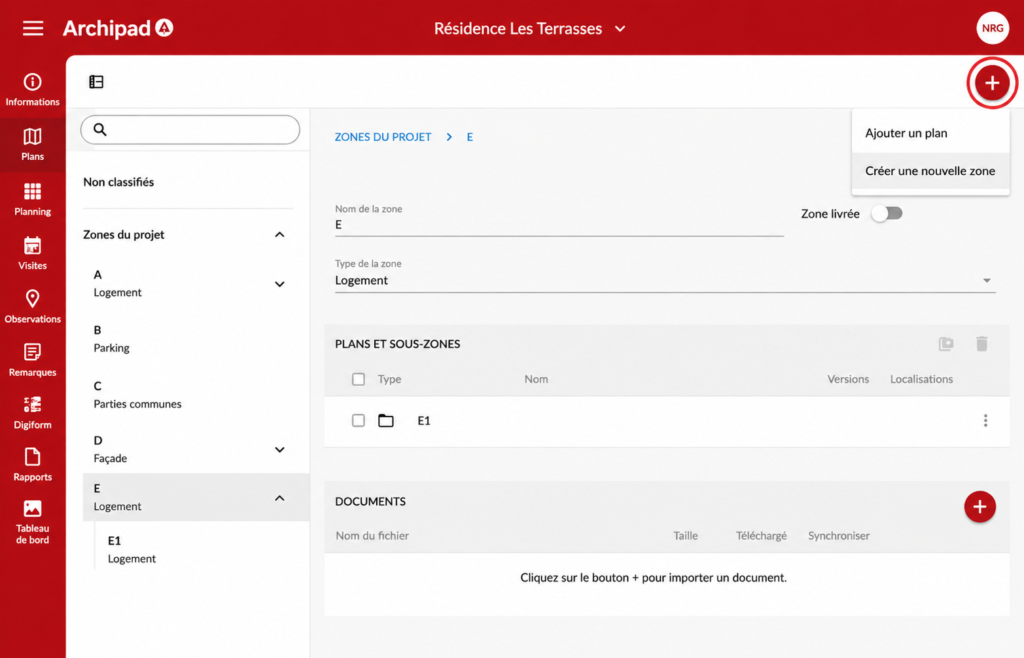
Steps
- Open the relevant Project, then go to Plans.
- In Project Regions, select the Region in which you want to create a sub-region.
- Click the + button, then select Create a new region.
- Enter the name and select the region type.
- The new sub-region appears in the parent region.
Result
Your sub-region is created. You can then add Plans and Documents to organize your project’s information.
Good to know
You can create multiple levels of sub-regions to adapt the organization to your project’s structure.