


Available on
- 🖥️ Archipad Web
- 🤖 Android (same steps as the Web version)
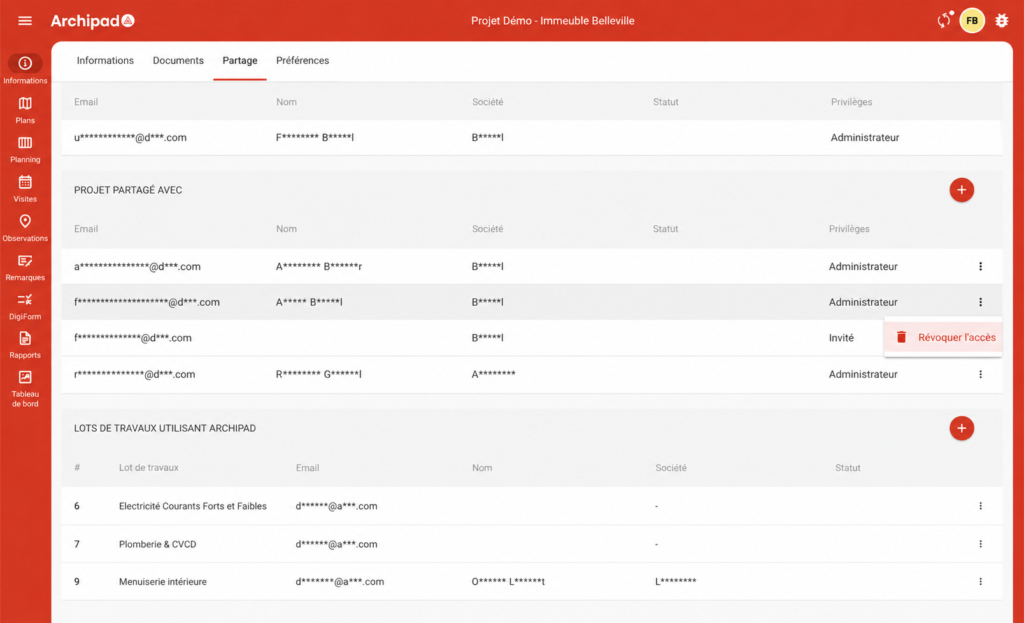
Modify a participant’s access level by revoking their access, then inviting them again with the desired permissions.
Steps
- Open the Project, then go to Information > Sharing.
- In the Project shared with section, select the participant concerned, then click Revoke.
- Click the + button and enter their Email address again.
- Select the new access level, then click Invite.
The participant will receive a new invitation with the access level assigned to them.
To know
A participant’s access level cannot be modified directly. To change it, you must first Revoke their access, then Invite them again.
Once sharing is complete, Collaborators can Sign in on any platform: Web, Android, iOS