


Available
- 🖥️ Archipad Web
- 🤖 Android (same steps as the Web version)
- 📱 iPhone and iPad
From the Archipad After Sales Service app, Buyers report a Defect in their Unit, track its progress, then Sign-Off once the correction has been completed. This article describes the 5 steps, from login to signature.
Before you start: the Archipad After Sales Service app is free on iOS, Android and Web. The Developer must have enabled Buyer access, and your Email Address must be listed in the Contacts for your Unit.
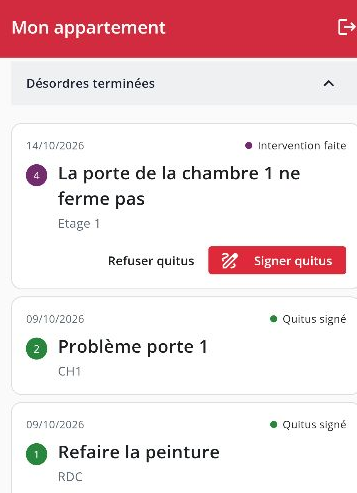
View “My Unit”: each Defect displays its Status. On a Defect with Completed Status, the “Decline Sign-Off” and “Sign” buttons appear.
Steps
- Log in. Open the Archipad After Sales Service app and enter the access code received by Email.
- Report the Defect. Place it on your Unit’s Plan, describe the issue and add up to 3 Photos. The Defect appears “Pending”: the After Sales Service Manager must review it.
- Track its progress. If the Defect is accepted, it moves to “In progress”: it is assigned to a Contractor with a due date.
- Check the correction. When the Contractor has finished, the Defect moves to Completed Status. Verify that the issue has been resolved.
- Sign-Off. Tap “Sign”, confirm, then Signature on Screen. The Defect moves to Sign-Off approved Status in “Completed Defects”. Not satisfied with the correction? Tap “Decline Sign-Off” and provide your reason: the Defect goes to arbitration.