


Add and manage your project documents
Available on
- 🖥️ Archipad Web
- 🤖 Android (same steps as the Web version)
The Documents tab lets you centralize your project files to share them with authorized Users.
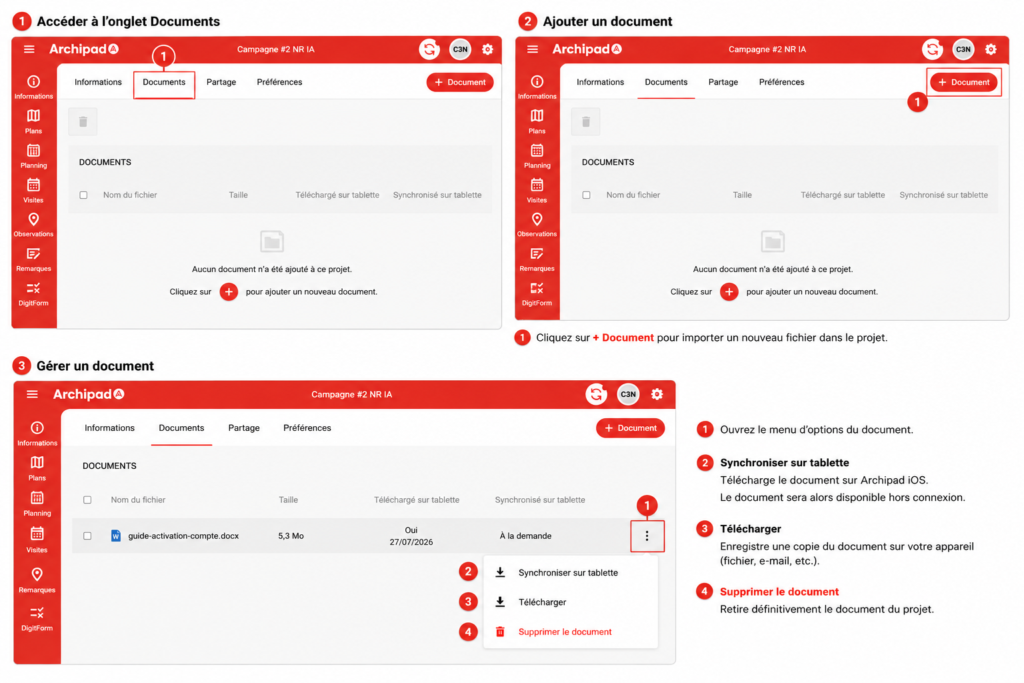
Add a document
- Open the relevant Project.
- Go to Information > Documents.
- Click + Document.
- Select the file to import.
- Once the import is complete, the document appears in the List.
Manage a document
To access available Actions:
- From the Documents List, click the three dots to the right of the document.
- Choose the desired Action:
- Force document sync to make the document immediately available on Archipad iOS
- Download to save a copy of the document to your device.
- Delete document to permanently remove it from the Project.
Good to know
Documents added to the Project are accessible to Users with the necessary permissions.