


The Admin Console brings together all administration settings for your company in Archipad.
It allows you to view your organization’s information, manage your organization’s entities, user accounts, subscriptions, and invoices.
Certain actions are reserved for company administrators.
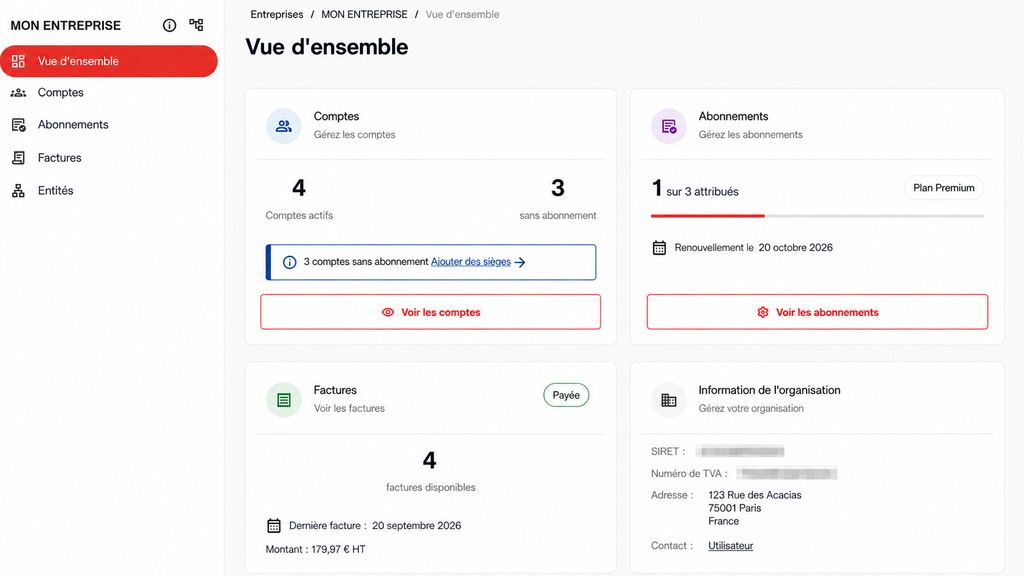
Overview
From the Admin Console overview, you can view key information about your organization:
- Organization Information
Find the General information for your company, including its name, address, legal information, and billing contact. - Associated Entities
View the entities associated with your organization. - Accounts
View the accounts linked to your company. From this menu, administrators can Invite new users, assign or remove a license from an account, lock or unlock access, and reset passwords. - Subscription
View and manage your company’s subscription: subscribed plan, number of licenses, and subscription status. - Billing
Find the List of invoices associated with your company and view your Billing History.